

- The Anatomy of a “Wasted” Day
- The Paradox of “Getting Things Done”
- What is The 3×3 Method?
- The Anatomy of the Grid
- How to Run the 3×3 System (The Daily Protocol)
- The Science of Constraints: Why Your Brain Loves 3×3
- The Math of Mastery: Why 9 Levers Beat Talent
- Common 3×3 Traps (And How to Debug Them)
- Trap #1: The "Giant Project" Camouflage
- Trap #2: Expanding the Grid "Just for Today"
- Trap #3: The "Fake Productive" Motion
- Trap #4: The Disconnected Grid (No North Star)
- Trap #5: The Missing Evening Review
- Trap #6: Using the Grid as a Guilt Scoreboard
- Trap #7: Ignoring Biological Energy
- Trap #8: The "System Hopping" Syndrome
- The Creator’s Quiet Rule
- Advanced Protocol: Integrating 3×3 with Skill Acquisition
- How to Start Now: The One-Page 3×3 Checklist
- Conclusion: The Freedom of "Enough"
Waking up at 5 AM has been changing my life.
I’ve been doing it consistently for a week now, and the immediate effect is simple: I have time. I finish my morning routine long before I used to even start it.
But that abundance of time immediately created a new problem: I didn’t know what to do with it.
It wasn’t a shortage of things to do; I had a list of priorities. I wanted to exercise, copy great writers, and focus on creation. But in the moment, I just drifted. I spent the day flowing like a leaf in a river, doing whatever felt easiest in the moment.
Played Valorant for 6 hours straight. yup.
I went to bed frustrated. Because I KNEW I had the awareness. I had TIME on my hands but I lacked the execution & focus.
I asked myself:
Why did this happen? Why did I work hard to create free time, only to waste it the moment I get it?
Why do we fight for control over our mornings, only to surrender it by noon?
The answer isn’t a lack of willpower. It’s a biological response to an overloaded system.
The Anatomy of a “Wasted” Day
Depending on which study you believe, a typical adult makes 35,000 decisions per day—everything from what to eat, to what to click, to whether to reply now or later.
Most of those choices are tiny and automatic, but you still burn mental fuel. This is decision fatigue: after enough micro-choices, the prefrontal cortex simply gets tired. Good judgment drops. The path of least resistance wins.
So when your to-do list is a buffet of 27 “important” possibilities, you aren’t heroically choosing between priority A and priority B. Your brain is quietly asking:
“Out of all these things… what the hell should I do right now?”
That endless “What next?” loop is a tax. The more options you have, the higher the tax. By mid-day, the easiest option is often:
- Open another tab.
- Check another feed.
- “Research a bit more.”
From the outside, it looks like procrastination. From the inside, it is a decision system that is fully booked.
The 40% Productivity Leak
Then comes the jumping. You stare at the list, paralysis sets in, and you end up doing the easiest thing just to feel something move.
But research on task switching shows that shifting between tasks costs up to 40% of your effective productive time. Not because the clock runs faster, but because the brain has to reconfigure itself every time it changes focus.
Every switch requires:
- Shutting down the rules of Task A.
- Loading the rules of Task B.
- Re-finding where you were.
Do that a few dozen times, and almost half the day’s potential output leaks away into invisible “transition costs.” And still, you blame your willpower.
This is not a character flaw. This is a Systems Failure.
Why “Busy” Days Feel Empty
At the end of these days, you might say, “I don’t know where the time went.” That’s not just a figure of speech; it’s how time perception works.
Neuroscience shows that our sense of time is tightly linked to what we encode in memory. When attention is scattered and actions blur into one another, the day collapses into a grey smear in hindsight.
- Few clearly defined actions →
- Few distinct memories →
- A strong feeling that the day “disappeared.”
It’s not that nothing happened. It’s that nothing registered as a clear, conscious, completed move.
Also read: Modern Life is the Zombie Apocalypse – This piece zooms out from one “wasted day” to show how modern life turns entire years into zombie-mode unless you build systems like 3×3.
The Paradox of “Getting Things Done”
To fix this, most productivity advice tells you to “hustle harder” or “manage your time better.” But the problem isn’t your time; it’s your focus allocation.
We have to admit that the standard “To-Do List”—the tool we trust to save us—is actually broken.
1. The Storage vs. Execution Error
In computing terms, your brain has a Hard Drive (long-term storage) and RAM (working memory).
- The Mega-List is your Hard Drive: It’s great for storing every request, idea, and obligation so you don’t forget them.
- Execution requires RAM: Your working memory is fragile. It can only hold a few items at once.
The mistake most people make is trying to work directly out of their Hard Drive. They look at a list of 50 items and try to process them all simultaneously. This fries your RAM. Your brain perceives the list not as a sequence of actions, but as a singular, insurmountable threat.
2. The Illusion of Motion
When staring at a mixed list of tasks, your tired brain will naturally gravitate toward the path of least resistance.
- Option A: “Write Chapter 1 of Book” (High Friction, High ROI)
- Option B: “Reply to 3 Emails” (Low Friction, Low ROI)
Your brain chooses the emails. You get a dopamine hit for checking a box, but you haven’t actually moved the needle on your life’s work. You are prioritizing Motion (being busy) over Action (being effective).
3. Open Loop Anxiety
Psychologists call this the Zeigarnik Effect: we remember uncompleted tasks better than completed ones. A long, unfinished list keeps these “open loops” running in the background of your mind, draining your battery even when you aren’t working.
To fix this, we don’t need better lists. We need a firewall.
We need a system that forces us to select only the data we can process today, and blocks out the rest.
We NEED the 3×3 Method.
It is not a productivity hack. It is a constraint-based operating system designed to filter out the noise, force High-ROI decisions, and bridge the gap between your massive vision and your messy reality.
What is The 3×3 Method?
At first glance, the 3×3 Method looks deceptively simple. That is by design. Complexity is the enemy of execution.
Here is the definition:
The 3×3 Method is a daily constraint system where you define 3 Core Priorities for the day, and break each priority down into 3 Specific Action Levers.
It creates a bounded “grid” of 9 total action blocks. This grid becomes your entire “Win Condition” for the day.
The Anatomy of the Grid
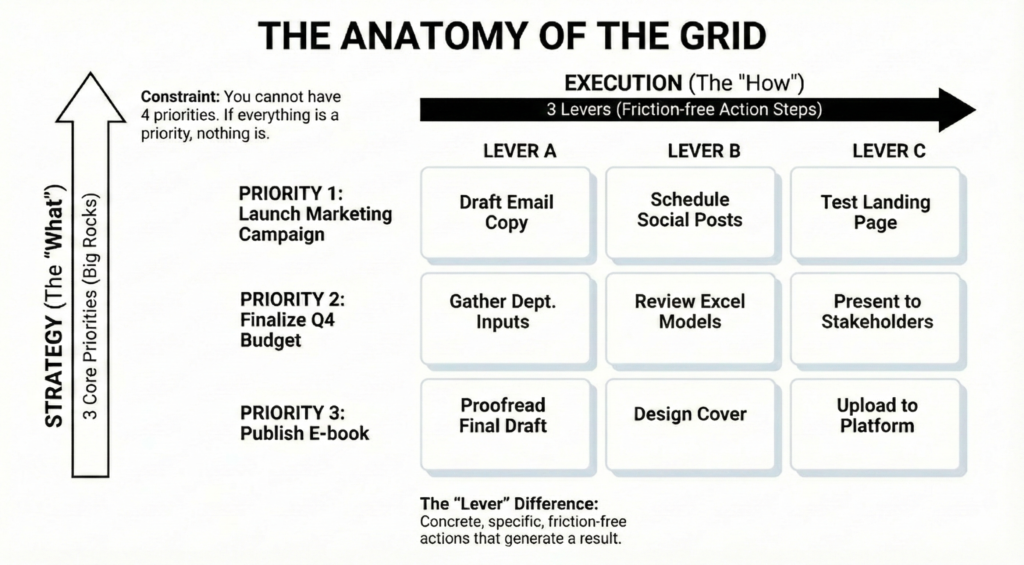
1. The Vertical Axis: Strategy (The “What”)
These are your 3 Core Priorities. These aren’t just “tasks.” They are outcomes. They are the “Big Rocks” that align with your weekly goals or your Personal Operating System.
If you only accomplished these three things today, would you feel satisfied? If the answer is yes, they go in the vertical column.
- Constraint: You cannot have 4 priorities. If everything is a priority, nothing is.
2. The Horizontal Axis: Execution (The “How”)
This is where the magic happens, and where most “To-Do” lists fail. For every Priority, you must identify 3 Levers—specific, friction-free action steps required to move that priority forward.
We call them “Levers” because they are mechanical. A lever requires force to move, but once moved, it generates a result.
The “Lever” Difference: A Concrete Example
Most people write “To-Do” items that are actually vague projects.
- Vague Entry: “Write Blog Post.”
This is terrifying to your brain. “Write Blog Post” is a heavy, undefined blob of work. It triggers procrastination because you don’t know where to start.
The 3×3 Approach:
- Priority 1: Publish “The 3×3 System” Article.
- Lever 1: Draft the “Paradox of Lists” section (30 mins).
- Lever 2: Create the 3×3 Grid Diagram in Canva.
- Lever 3: Upload to WordPress and hit “Schedule.”
Do you see the difference? The Priority holds the vision. The Levers hold the action.
By breaking the “Big Rock” into three “Pebbles” before you start working, you front-load the decision-making. When it’s time to work, you don’t have to think; you just have to pull the first lever.
The Power of the “Closed List”
The final rule of the 3×3 System is perhaps the most important: The Grid is a Closed System.
Once you have filled your 9 boxes for the day, the list is locked. You cannot add “just one more thing” in the middle of the day.
This creates a psychological finish line. In a world of infinite scroll and infinite work, the 3×3 System gives you something rare: Permission to be done.
The 3×3 System is a daily operating system that forces life, work, and mastery to pass through 9 deliberate actions instead of 900 automatic reactions.
The next part is where it gets “hands-on”
How to Run the 3×3 System (The Daily Protocol)
The theory is great, but the value is in the execution.
You don’t need a fancy app. You need a pen, a piece of paper, and this specific algorithm.
If you try to “wing it,” you will fail. Follow these steps exactly.
Step 1: The Harvest (The Night Before)
Goal: Move data from your “Hard Drive” (Backlog) to your “RAM” (Tomorrow’s Plan).
Do not do this in the morning. Morning you has decision fatigue; Evening you has clarity.
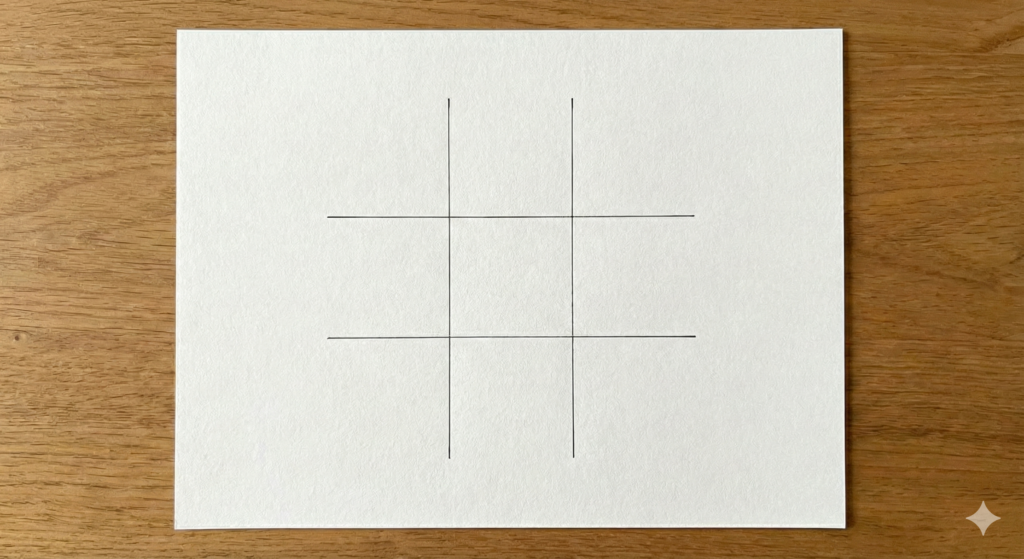
So the night before, you start with a blank piece of paper and draw a simple 3×3 grid. This is the canvas for your next day’s plan.
- Open the “Hard Drive”: Open your Master To-Do list or Project Management tool.
- Apply the “Needle Mover” Filter: Scan the list. Don’t look for what is “urgent” (emails, slack). Look for what is important.
- Ask: “If I only finished 3 things tomorrow, which 3 would make me feel like I won the day?”
- Populate the Grid: Write your top 3 choices in the Vertical Column (The Priorities).
- CRITICAL RULE: If the item takes more than 90 minutes, it is a Project, not a Task.
- Bad Priority: “Redo Website.” (This is a 2-week project).
- Good Priority: “Update Homepage Hero Section.” (This is a 60-min outcome).
- CRITICAL RULE: If the item takes more than 90 minutes, it is a Project, not a Task.
The Parking Lot (Handling the Gravel):
You will inevitably have small, annoying tasks (pay electricity bill, reply to Steve, book dentist).
- Do not put these in the main 3×3 Grid. They dilute your focus.
- Action: Draw a line at the bottom of your page. Label it “PARKING LOT” (or Admin/Gravel).
- Dump: Write all the small, maintenance tasks here. This keeps them safe, but keeps them off the road.
The 2:1 Ratio:
Ensure at least 2 of your 3 Priorities are High-ROI (Creating, Building, Learning). You are allowed 1 “Maintenance” Priority (e.g., “Life Admin”) to catch the gravel (bills, calls, errands).
Step 2: The Breakdown (Where Most People Get Stuck)
Goal: Turn “heavy” goals into “frictionless” steps.
This is where you likely failed yesterday. You looked at a Priority and didn’t know how to slice it.
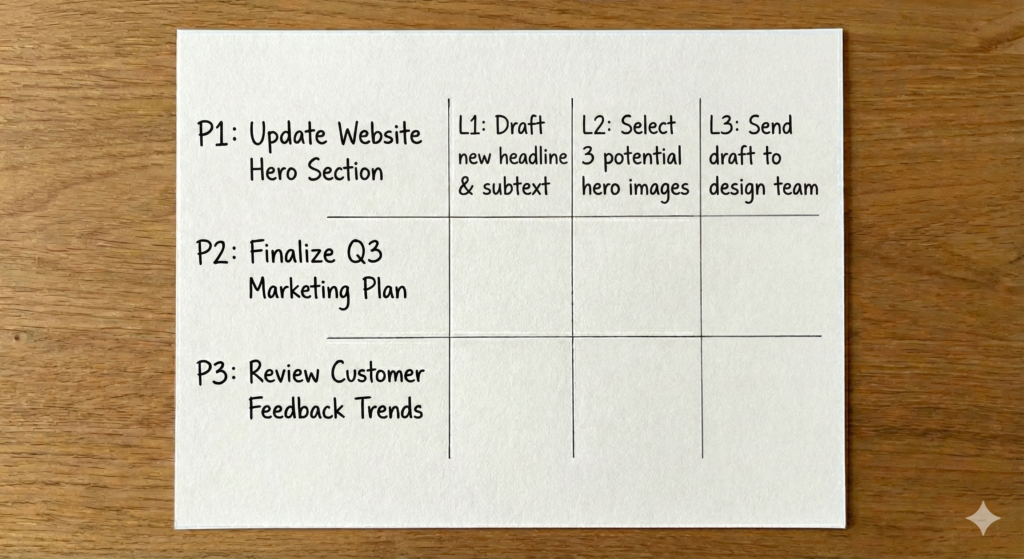
For each Priority, you must identify 3 Levers. A “Lever” is a physical action that requires zero thinking to start.
The “Verb-Noun-Specifics” Formula:
Every lever must follow this syntax: [Action Verb] + [Specific Object] + [Constraint].
| Priority (The Goal) | Bad Lever (Vague/Scary) | Good Lever (Frictionless) |
|---|---|---|
| Write Newsletter | “Write draft” | Draft the 3 main headers + intro (20 mins) |
| Fix Website Bug | “Debug code” | Locate the specific error line in index.html |
| Sales Outreach | “Find leads” | List 10 URLs of potential clients in Excel |
Troubleshooting the Breakdown:
- “I can’t think of 3 levers!”
- That’s okay. If the task is small, maybe it only needs 2 levers. Don’t force a 3rd. Leave the box blank.
- “I have 10 levers for this!”
- Then your Priority is too big. Slice the Priority in half.
- Old Priority: “Write Article.”
- New Priority: “Research & Outline Article.” (Levers: Read 3 sources, Dump notes, Organize H2s).
- “I don’t know the steps yet.”
- Then your Priority is actually “Plan the Project.”
- Lever 1: Google “How to X”.
- Lever 2: Read top 3 results.
- Lever 3: Write down the steps for tomorrow’s grid.
Step 3: Time-Blocking the Grid (The Reality Check)
Goal: ensure your plan fits into physics.
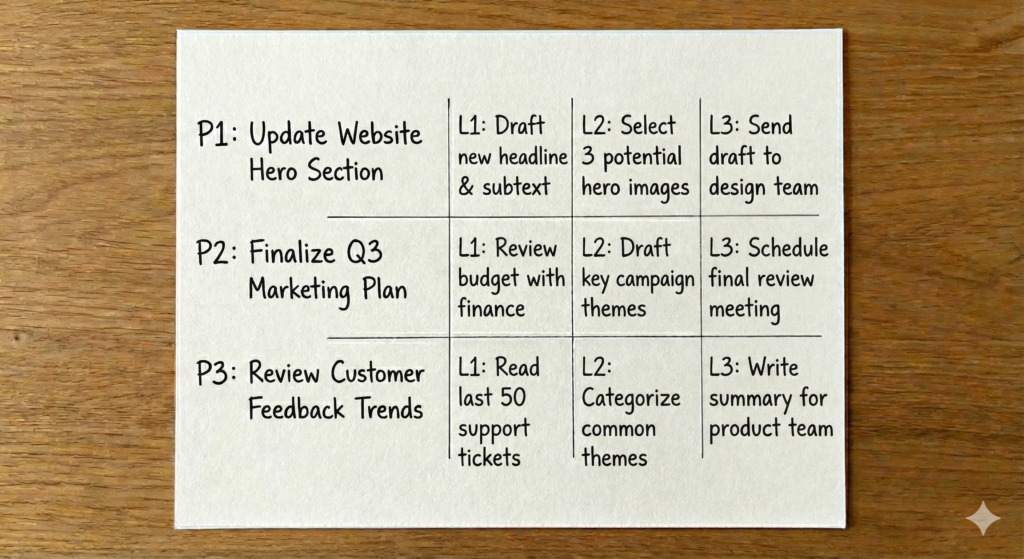
Once your grid of 9 boxes is filled, do a “Sanity Check.” Assign a rough time estimate to each Priority Row.
- Row 1: ~60 mins
- Row 2: ~45 mins
- Row 3: ~30 mins
- Total Deep Work: ~2.5 Hours.
If your total exceeds 4 hours, you are hallucinating. You will not do it.
Delete one Priority or shrink the Levers immediately.
The 3×3 System is designed for 2–4 hours of Deep Work. The rest of your day (8 hours+) is for meetings, lunch, commuting, and “Gravel.” Do not book 8 hours of work in the 3×3.
Step 4: The Execution (Sequential Processing)
Goal: Be the machine.
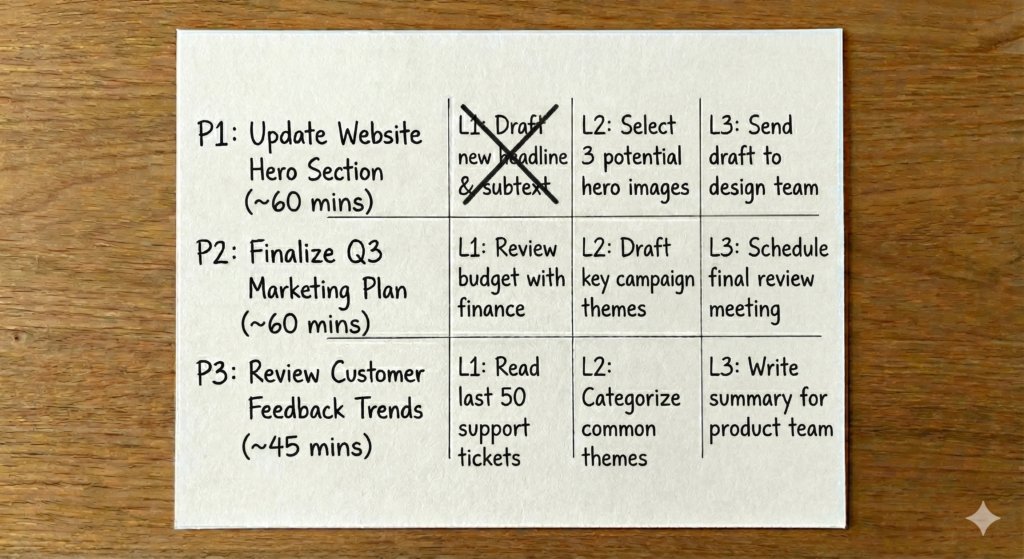
When you wake up:
- Hide the Phone.
- Look at Row 1, Lever 1.
- Execute.
The Rules of Engagement:
- Single Threading: Do not touch Row 2 until Row 1 is done (or blocked).
- Ignore the Parking Lot: Do not touch the Parking Lot tasks until at least 2 Rows of the Grid are complete. The Parking Lot is a reward for doing the hard work.
- The “Momentum” Trick: If Lever 1 feels too hard, you made it too big.
- Emergency Fix: Cross it out and write a “Micro-Lever” below it.
- Example: Can’t “Draft Section”? Change it to “Open Google Doc and write one sentence.”
- Cross it Out: Use a physical pen. The ink on paper signals “Completion” to your brain better than a digital tick.
The “Done” State:
When the 9 boxes are checked, you have won.
Even if your inbox is full.
Even if the house is messy.
You moved the needle.
Now you are free to tackle the Parking Lot or simply rest.
What about the “Small Stuff”?
“But Dewansh, I still have to answer emails and walk the dog!”
Of course. The 3×3 Grid is for your High-Impact Work. Everything else—chores, admin, slack messages—is “Gravel.” You fit the gravel around the big rocks. Once you have finished your 3×3 (or a significant chunk of it), you can spend the rest of the day on low-energy admin tasks without guilt, because you know the important work is already secured.
Why the 3×3 Works Even on “Bad Days”
Most productivity systems are fragile. They assume you will wake up with 100% energy, zero distractions, and perfect focus. The moment a crisis hits or you wake up with a migraine, the system collapses, and you feel like a failure.
The 3×3 System is designed to be Elastic too.
The structure (the Grid) remains constant, but the content scales up or down based on your reality.
- On High-Energy Days: Your Levers are aggressive.
- Priority: Create Course Module.
- Lever 1: Record 45 mins of video.
- On Low-Energy Days: You keep the same Priorities, but you shrink the Levers to the floor.
- Priority: Create Course Module.
- Lever 1: Open the slide deck and fix one typo.
You still fill the grid. You still respect the 3×3 structure. But you adjust the difficulty setting. This keeps the habit of the system alive even when your energy is dead. It proves to your brain that you are consistent, regardless of the weather.
The Closing Loop: How The Day “Clicks Shut”
Coming back to the “Permission to be done” part. Tim ferries got asked the question, “How do you sleep when you got loads of work to do”. He said, I just have a “Shutdown Ritual” and that’s what I integrated in this system too.
Before you leave your desk in the evening:
Most nights, it looks like this:
- Look at the 3×3 grid.
- What got done? What didn’t?
- Ask two questions:
- “What actually blocked me?”
- “Where did I overestimate or underestimate my energy?”
- Write 1–3 quick notes.
- “Deep work block got invaded by email → close inbox next time.”
- “Evening learning too ambitious → shrink to 15 minutes.”
- Draft tomorrow’s rough 3×3.
- Carry forward what still matters.
- Kill what doesn’t.
- Adjust placements according to real energy, not fantasy.
This takes 5–10 minutes.
But it does three crucial things:
- It tells the nervous system the day is over (reducing that “always on” feeling).
- It turns guilt into information (less shame, more curiosity).
- It gives tomorrow a head start (you wake up to decisions already made).
And…. the loop lives on.
The Science of Constraints: Why Your Brain Loves 3×3
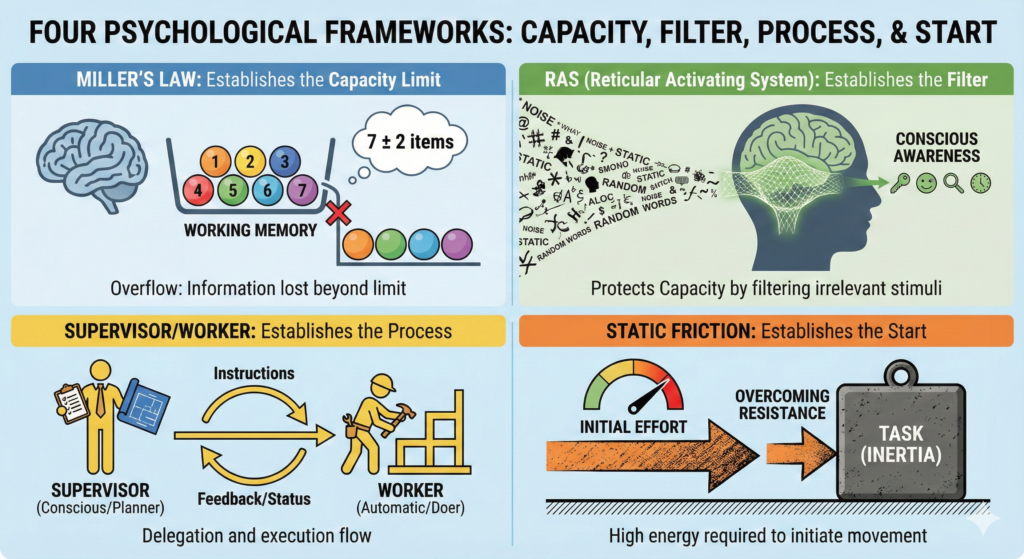
You might be asking: “Why 3? Why not 5 priorities? Why not a top 10?”
The 3×3 System isn’t arbitrary. It is engineered around the biological hardware limitations of your brain. When you try to fight your biology, you get burnout. When you design around it, you get flow.
Here are the four cognitive principles that make this grid work.
1. Miller’s Law (Respecting Your RAM)
In cognitive psychology, Miller’s Law suggests that the average human working memory can only hold about 7 (plus or minus 2) objects at once.
When your to-do list has 20 items, you are technically overloading your RAM. Your brain drops the ball because it physically cannot index that many priorities simultaneously.
Three is the “Safety Zone.”
- 1 Priority feels too risky (what if I get stuck?).
- 5 Priorities pushes the cognitive limit (anxiety creeps in).
- 3 Priorities provides focus without fragility. It is enough to feel productive, but small enough to hold in your head comfortably all day.
2. Hacking the RAS (Your Biological “Bouncer”)
Have you ever decided to buy a specific car, and suddenly you start seeing that exact model everywhere on the road?
That isn’t a coincidence. That is your Reticular Activating System (RAS) at work.
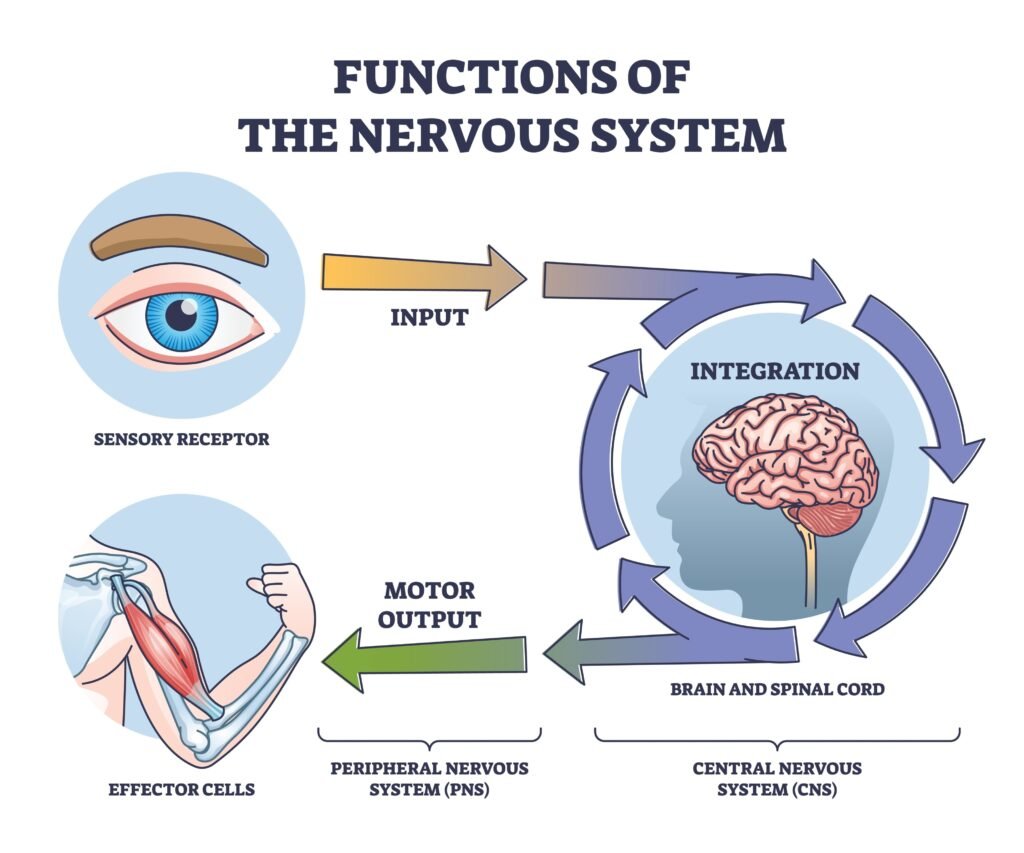
The RAS is a network of neurons in your brainstem that acts as a filter for sensory input. It is your brain’s “Bouncer.” It decides what information is relevant enough to get your attention and what is just noise.
The 3×3 System acts as the programming code for your RAS.
- Without the grid: Your RAS has no instructions, so everything (emails, Slack pings, dirty dishes) feels equally “urgent.”
- With the grid: When you consciously write down your 3×3, you are handing the Bouncer a VIP guest list. You are telling your brain: “These are the patterns to notice. Ignore the rest.”
The result? Distractions don’t disappear, but their emotional pull fades. When you deliberately choose 9 things, your brain quietly deletes thousands of fake urgencies from your perceptual field. This is the mechanism behind “laser focus.”
3. Separating “Planning” from “Doing”
The single biggest cause of procrastination is mixing Decision Making with Execution.
- The “Supervisor” Mode: Requires high executive function (Prefrontal Cortex). It decides what is important and how to tackle it.
- The “Worker” Mode: Requires focus and flow. It just wants to execute instructions.
When you look at a vague task like “Work on Project,” your brain has to be the Supervisor and the Worker at the same time. You have to decide where to start while trying to start. This causes immediate decision fatigue.
The 3×3 System splits these roles. By defining your Levers the night before, you let the Supervisor finish the shift. Then, when you sit down to work, you are just the Worker. You don’t have to think; you just have to execute.
4. Lowering “Static Friction”
In physics, Static Friction (the force needed to get an object moving) is always higher than Kinetic Friction (the force needed to keep it moving).
The hardest part of any task is the first 2 minutes.
By breaking a scary Priority (“Write Chapter”) into a tiny, almost laughable Lever (“Open Scrivener and write one header”), you drastically lower the Static Friction.
This triggers the Dopamine Loop. Every time you tick off a Lever, your brain releases a micro-dose of dopamine. This isn’t just a reward; it is fuel. Checking off Lever 1 gives you the neurochemical energy to attack Lever 2. You are literally engineering your own momentum.
The Math of Mastery: Why 9 Levers Beat Talent

We often romanticise “Talent” or the “Big Break.” We imagine success happens in a single, cinematic montage of inspiration.
But mastery is not a montage. Mastery is math.
When you look at the 3×3 grid, you might just see a daily checklist. But if you zoom out, you are looking at an algorithm for undeniable growth.
Let’s look at the “Compounding Behavioural Interest” of just 9 small actions a day:
- 9 Levers / Day
- 63 Levers / Week
- 252 Levers / Month
- ~750 Levers / 90-Day Cycle
- 3,285 Levers / Year
Read that last number again. 3,285.
Small numbers, stupid big outcomes
If you execute the 3×3 Method, you are not just “working.” You are making 3,000+ deliberate moves in the direction of your future self every single year.
Volume Negates Luck
Most people rely on “Talent,” which usually manifests as bursts of energy followed by weeks of inactivity.
- Talent might do 50 amazing things in January, then burn out until March.
- The 3×3 System does 9 boring things every single day, forever.
By the end of the year, the “Talented” person has done 600 things. You have done 3,000. No one is talented enough to beat 3,000 conscious moves per year.
The “Identity Vote” & Your Alter Ego
This creates a profound psychological shift. As James Clear (and others) have noted, every action you take is a “vote” for the type of person you wish to become.
When you use the 3×3 System, you are casting 9 Votes per day for your Alter Ego.
- If your Priority is “Writing” and you pull 3 writing levers, you cast 3 votes for “I am a Writer.”
- If your Priority is “Fitness” and you pull 3 health levers, you cast 3 votes for “I am an Athlete.”
Over a 90-Day Cycle, you have cast nearly 800 votes for that new identity. At that volume, Imposter Syndrome begins to die. You stop hoping you are that person; you have the data to prove you are.
Escaping the “Imitation” Stage
How does this plug into the Stages of Mastery?
Mastery requires reps. There is no way around the “Suck” (Stage 1: Imitation). Most people stay stuck in Imitation for years because they only take action when they “feel like it.”
With the 3×3 System, you are forcing reps through the system.
- Day 1-30 (250 reps): You brute-force through the awkward Imitation Stage.
- Day 31-60 (250 reps): You find rhythm and enter the Integration Stage.
- Day 61-90 (250 reps): You begin to experiment and touch the Innovation Stage.
By treating a 90-day period as a “Year” (The 90-Day Year framework) and applying the 3×3 System, you can compress a year’s worth of skill acquisition into three months.
You don’t need to be a genius. You just need to be a machine that hits “9” every day.
From here, talking about mistakes with the 3×3 System becomes much more interesting
Common 3×3 Traps (And How to Debug Them)
Once you understand the power of the 3×3 Grid, your brain will do something very human: It will try to break it.
We naturally crave complexity. We feel safer when we are overwhelmed because “busy” feels like “working.”
If you find the system failing, you haven’t “failed.” You have simply fallen into a known trap. This section isn’t about shame; it’s about debugging. Here are the 8 most common errors and the patch code to fix them.
Trap #1: The “Giant Project” Camouflage
On Day 1, the grid looks clean. On Day 10, it looks like this:
- Launch Course
- Redo Entire Website
- Get in Best Shape of Life
Technically, that’s three priorities. Realistically, those are multi-week projects pretending to be Tuesday tasks. Your brain sees these massive mountains, activation energy spikes, and you procrastinate.
> Debug Code: Shrink the Unit. The 3×3 Grid only speaks the language of actions that fit inside one day. If a task takes >90 minutes, it is a Project.
- Bad: “Launch Course.”
- Fixed: “Outline 3-module structure.”
- Fixed: “Draft lesson ideas for Module 1.”
Projects live in your notes. Actions live in your 3×3.
Trap #2: Expanding the Grid “Just for Today”
You have a busy week, so you bargain with yourself: “Okay, today it’s a 5×7 grid… that’s still a system, right?” Suddenly, you have 35 “non-negotiable” items. The constraint is broken. The 3×3 has died; it just hasn’t been buried yet.
> Debug Code: Protect the Constraint. Keep the 3×3 sacred. If you have more to do, put it in a separate list called “The Parking Lot.”
- Rule: You are only allowed to touch the Parking Lot after the 3×3 is 100% complete.
- The point of the system isn’t to hold everything. It’s to hold what matters even if everything else explodes.
Trap #3: The “Fake Productive” Motion
Your grid is full of things that look like work but don’t move the needle:
- Reformatting slides again.
- Tweaking Notion aesthetics.
- Checking analytics for “insight.”
This is Motion, not Action. You will finish the day exhausted but with zero asset value created.
> Debug Code: The “Wi-Fi Test.” Ask: “If the Wi-Fi died after these 9 actions, would I still feel like today mattered?” If the answer is No, you are stuck in motion. Swap in actions that:
- Ship something.
- Solve a specific problem.
- Create an asset future-you can use.
Trap #4: The Disconnected Grid (No North Star)
You have a dreamy 90-Day Plan somewhere, but your daily grid is just “whatever feels hottest right now.” After a month, you are busy, but you haven’t moved an inch toward your Quarterly Goals.
> Debug Code: The Translator Test. The 3×3 Grid is not a mood board. It is a translator between your Vision and your Day. For every Priority row, ask: “Which 90-day outcome does this serve?” If you can’t answer that, the priority is just noise, obligation, or someone else’s agenda.
Trap #5: The Missing Evening Review
You tick boxes, close the notebook, and hope for the best tomorrow. There is no pattern recognition. No adjustment. Just repetition.
> Debug Code: The 5-Minute Feedback Loop. Turn the grid from a scorecard into a laboratory. Every night, take 5 minutes:
- Circle what didn’t get done.
- Ask Why: Was it too big? Wrong energy time? Did I get hijacked?
- Adjust: Rewrite it for tomorrow—smaller, later, or kill it entirely.
Trap #6: Using the Grid as a Guilt Scoreboard
Every unchecked box becomes a voice in your head: “See, you can’t be consistent.” Eventually, the grid feels emotionally radioactive, so you stop opening it.
> Debug Code: Data, Not Sin. Change the story. The grid is not a judge; it is a mirror.
- Unchecked boxes are not moral failures; they are Planning Data.
- If you consistently hit 4/9, that’s not “I suck.” That’s “My current capacity is 4.”
- Fix: Design for 5 tomorrow. Earn your way up to 9. The goal is a grid that tells the truth, not a grid that looks perfect.
Trap #7: Ignoring Biological Energy
You technically honor the 3×3, but you schedule Deep Work at 3:00 PM (during your slump) or Admin during your peak focus. The result? Slogging through wet concrete.
> Debug Code: Match Task to State. Rebuild the day using your energy, not just time slots.
- Peak Focus: Hardest Row.
- Messy Middle: Medium focus.
- Slump: “Gravel” / Admin.
- Experiment: If writing at night feels impossible, stop forcing it. Let the grid show you your own rhythm.
Trap #8: The “System Hopping” Syndrome
A few bad days happen—illness, travel, chaos. Your instinct is: “The 3×3 isn’t working. I need a new app/system.” You reinvent the wheel every 3 weeks, never letting any system live long enough to compound.
> Debug Code: Lower the Bar, Keep the Frame. On hard weeks, do not abandon the grid. Shrink it.
- Make the actions hilariously tiny.
- Make one Priority “Stability” (Sleep, Food, Basics).
- Why? Because the moment the 3×3 survives chaos, it stops being a tool and starts being part of your identity.
The Creator’s Quiet Rule
If the 3×3 ever feels as overwhelming as your old to-do list, you have broken the spec.
The Spec is:
- 3 Priorities.
- 3 Finishable Actions each.
- Energy-aligned slots.
- Direct line to 90-day outcomes.
- No extra drama.
The people who win aren’t the ones with the perfect grid. They are the ones who keep the grid alive—imperfectly—stacking thousands of identity votes while everyone else is still looking for the “perfect system.”
Advanced Protocol: Integrating 3×3 with Skill Acquisition
Most people view productivity and learning as two separate lives.
- Productivity is for 9-to-5.
- Learning is for nights and weekends (if you have energy left).
But if you want to be a Polymath or a top-tier creative, Learning must be part of your Daily Operations.
The 3×3 System is the perfect container for this. You can dedicate one of your 3 Priorities exclusively to Skill Acquisition.
The “Skill Row” Architecture
Instead of treating a skill like “Learn Spanish” or “Master Python” as a vague hobby, you treat it as a Priority Row in your daily grid.
But you don’t just write “Practice Python.” You break the skill down using the Input-Output-Feedback Loop.
The Framework:
- Lever 1 (Input): Absorb the concept (Theory).
- Lever 2 (Output): Apply the concept immediately (Practice).
- Lever 3 (Review): Critique the result (Feedback).
Concrete Example: Learning Copywriting
Let’s say your Quarterly Goal is to master Copywriting. A typical “Skill Row” in your 3×3 grid looks like this:
Priority: Master Copywriting (Headlines)
- Lever 1 (Input): Read Chapter 4 of Great Leads by Masterson (20 mins).
- Lever 2 (Output): Hand-copy 5 classic headlines, then write 5 of my own for my current project.
- Lever 3 (Feedback): Run my 5 headlines through a headline analyzer tool or post them in a peer group for critique.
Navigating the “Stages of Mastery”
Using the 3×3 grid actually changes how you move through the Stages of Mastery (Imitation, Integration, Innovation).
1. Stage 1: Imitation (The “Copy” Phase)
- When you are a beginner, your Levers are 100% focused on copying the greats.
- Lever: “Recreate this specific design pixel-for-pixel.”
- The grid prevents you from trying to be “original” too early. It forces you to put in the reps.
2. Stage 2: Integration (The “Combine” Phase)
- As you improve, your Levers shift. You start mixing skills.
- Lever: “Write a blog post (Writing) using the SEO principles I learned last week (SEO).”
- The grid becomes a mixing board for your growing skill stack.
3. Stage 3: Innovation (The “Create” Phase)
- Now, your Levers are about testing new theories.
- Lever: “Launch a bold new A/B test that breaks the standard rules.”
By locking a “Skill Row” into your daily 3×3, you stop wishing you were better and start engineering your improvement. You turn “Someday” into a checkbox.
How to Start Now: The One-Page 3×3 Checklist
At this point, the idea is clear.
You don’t need more theory.
You need to run the system. Here is the condensed protocol to launch your first 3×3 Grid tonight.
1. The Setup (The Night Before)
- [ ] Open your “Hard Drive”: First dump everything that’s pulling on you right now. Then look at your Master Task List / Weekly Goals.
- [ ] Select 3 Priorities: Pick the 3 distinct outcomes that would make tomorrow a “Win.”
- Check: Are at least 2 of them High-ROI / Growth tasks?
- Check: Does each Priority align with a 90-Day Goal?
2. The Breakdown (The Magic Step)
- [ ] Define 3 Levers per Priority:
- Row 1: [Lever 1] [Lever 2] [Lever 3]
- Row 2: [Lever 1] [Lever 2] [Lever 3]
- Row 3: [Lever 1] [Lever 2] [Lever 3]
- [ ] Run the “Friction Test”: Is every Lever a specific, physical action? (e.g., “Draft 100 words” vs. “Write”).
- [ ] Close the List: Draw a box around the grid. No 4th row.
3. The Execution (The Work Day)
- [ ] Start with Row 1: Do not touch email/admin until you have made progress on Priority #1.
- [ ] Single-Task the Levers: Cross them off physically. Enjoy the dopamine.
- [ ] Respect the Limit: If you finish early, you are done. Do not punish efficiency with more work.
4. The Shutdown (The Loop)
- [ ] Review the Grid: What didn’t get done? Why? (Treat it as data).
- [ ] Reset: Draft the new grid for tomorrow immediately.
- [ ] Click Shut: Close the laptop. The day is over.
The 3×3 Template (Copy/Paste)
If you want to start right now in your Notes app, copy this block:
DATE:
PRIORITY 1: [GOAL] [ ] Lever 1: [ ] Lever 2: [ ] Lever 3:
PRIORITY 2: [GOAL] [ ] Lever 1: [ ] Lever 2: [ ] Lever 3:
PRIORITY 3: [GOAL] [ ] Lever 1: [ ] Lever 2: [ ] Lever 3:
PARKING LOT (Gravel/Admin): *
Conclusion: The Freedom of “Enough”
We live in an age of infinite inputs. Infinite emails, infinite content, infinite opportunities, and infinite “to-dos.”
If you try to meet infinite demand with your finite energy, you will lose. You will burn out, yet still feel like you’re falling behind.
The 3×3 System is not just a productivity system. It is a Personal Firewall.
It is a way of drawing a line in the sand and saying: “These are the 9 things that matter today. Everything else is noise.”
When you respect the grid, you get something far more valuable than just “completed tasks.” You get Peace.
You get the permission to close your laptop at 5:00 PM without guilt. You get the quiet confidence of knowing you moved your biggest mountains, instead of just kicking pebbles. You get to look back at a year and see 3,000+ votes cast for the person you want to become.
Don’t let the simplicity fool you. Amateurs look for complex apps to manage their chaos. Pros look for simple constraints to force their focus.
Draw the grid. Fill the boxes. Do the work. And then, enjoy the freedom of being done.
— Dewansh